
Clutter is the official language used by corporations to hide their mistakes.
William Zinsser
One of my dream cars is the Porsche Carrera GT. It can go 0 to 100 km/h in 3.57 seconds, all thanks to its 603 horsepower engine and curb weight of about 3,000 pounds.
Compare that with my current car, a Toyota Corolla, which has a 132 horsepower engine and weighs about 3,100 pounds. Not only does the Porsche have four times more horsepower than my Corolla, but it also weighs almost 100 pounds less!
The Porsche Carrera GT is a perfect example of how to make a car drive faster. First, increase the power the engine produces. Second, remove any unnecessary items to make the car as light as possible.
The second option is often the easiest, fastest, and cheapest way to speed up a car. Rip out the sound system, remove the bits of junk from the trunk, and (if you really have the need for more speed) pull out the rear seat. The 100-pound weight loss will make the car accelerate a tiny bit quicker.
The same can be said of user onboarding. When it’s bloated with too many unnecessary steps, new users will abandon an app and leave it for good. Users have little to no patience to read long directions and no time for steep learning curves. The default is to find the easiest and quickest path. That’s why the First Strike needs to be hit as quickly as possible.
In this chapter, we’ll map out and evaluate the path for new users to ensure every step in the early stages of your customer’s journey is as efficient and effective as possible.
The Straight-Line Onboarding
In the previous chapter, I introduced Wes Bush’s Bowling Alley Framework and the concept of the First Strike—when first-time users achieve their desired outcome. In 10-pin bowling, that’s when all of the pins are knocked down with a bowling ball. It sounds straightforward, right?
In reality, it’s more complicated than that. The narrow oiled bowling lane is 41.5 inches wide, and the ten pins are 60 feet away. On both sides of this lane are gutters.
The goal is to roll a heavy ball straight down the lane to knock down as many pins as possible. A “strike” is when all of the pins are hit on the first try. A “spare” is when no pins are left standing after the second round.
If you’re new to bowling, you’ll quickly realize how hard (and frustrating!) it is to hit any of the pins. Chances are, the majority of your balls will end up in the gutter.
That’s where gutter bumpers come into play; they block balls from falling into the gutter to give you a better chance of hitting some of the pins.
When it comes to user onboarding, bumpers help new users achieve their First Strike. Bumpers include conversational triggers (such as onboarding emails, SMS, browser notifications) and in-app triggers (such as welcome messages, product tours, and progress bars). I’ll be covering these bumpers more in the next chapter.

For now, let's identify the path that will help users achieve their First Strike. If you’ve watched professional bowlers, you’ll notice how they curve the ball down the lane. This allows them to find the sweet spot that results in a strike. This is for pros, though. Beginners need to learn how to roll the ball straight down the lane first.
In user onboarding, this is called Straight-Line Onboarding. It’s the minimum number of steps users need to take to achieve their First Strike. In my experience, most onboarding experiences are anything but a straight line. Well over 30% of them are superfluous and end up creating more friction for new users than necessary.
Creating a Straight-Line Onboarding experience is critical in getting more users to experience a product’s value. You’re in a race against time.
The goal is to decrease the time-to-value (TTV), the amount of time it takes a new customer to realize the value of a product. A short TTV means customers receive a faster return on their investment of time—and that means they are more likely to stick around!
This is exactly what the UserGuiding team found after they’ve removed unnecessary steps in their product’s onboarding:
As soon as we removed the unnecessary info and directed the focus of our onboarding process to our Chrome extension, where the most of UserGuiding’s value lies, we’ve seen our conversion rates almost double.
Osman Koc, Co-founder of UserGuiding
With this in mind, here are three steps to building your own Straight-Line Onboarding experience.
How To Build Your Straight-Line Onboarding
To help you visualize this, I’ll be going through the steps to develop the Straight-Line Onboarding of a fictional online party invitation tool that I’ll call PartyParrot.
1. Map out your onboarding path
The first step is to sign up for your own product as if it’s your first time. It’s probably been a while since you’ve done that. More likely than not, it’s been a while since anyone in your company has done that.
The goal is to come in with a fresh perspective and map out each step in the user experience before they become highly engaged users. To do this, you’ll want to go beyond filling in the form on your site. Go through the motions of signing up to study the first impression of your product, whether that’s a Google search, paid ad, blog post, or email invitation.
Since our online party invitation tool is fictional, let's start by looking at how Canva shows their design templates.
Someone might discover it by Googling, “Instagram post design template.”
The very first result on the search engine results page (SERP) is a landing page dedicated to Canva’s Instagram post templates.

This link leads to a page with several Instagram post templates.
.avif)
From there, users can select a template, edit it, add their own photos, and then download their masterpiece.
And voila, just like that, they’ve achieved their First Strike.
These first few touchpoints are key for users to experience the wonder of Canva for the first time. Here’s the entire onboarding path from a Google search:
- Search for “Instagram post design template”
- Click on Canva’s landing page
- Select an Instagram template
- Edit the Instagram design template
- Add your own photos
- Download the image
Notice how the first two steps aren’t even part of the website; they both occur on the SERP. Don’t forget that user onboarding doesn’t typically start on a website. It begins with the very first touchpoint.
Another remarkable aspect about Canva’s onboarding path is that users don’t have to sign up at all to experience Canva’s First Strike; their growth team has clearly optimized their user onboarding experience.
Now it’s your turn: document every step that’s required for users to achieve your product’s First Strike. Be sure to reference every field that you’re asking users to complete, including each button they need to click. I also recommend taking a screenshot of every step so you can refer to it later (you’ll need this for later steps in the framework).
If you’re doing this with the onboarding team in a room, you can use sticky notes and markers. Write down each step in one sticky note. For this exercise, consider each field a user has to fill out as an onboarding step. So if there are 10 fields on a signup page, that’s 11 steps, including clicking on the submit button.
If your team is remote, you can use tools like Trello, Notion, or Miro. I’ve listed out every step in Canva’s onboarding process with Trello at bit.ly/canva-path.

For the remaining steps, I’ll use PartyParrot as an example. Let’s say the current onboarding path from their website looks something like this:
- Enter email address
- Enter name
- Enter password
- Click “Create Account”
- Confirm email address
- Sign back in
- Click “Create New Invitation”
- Select a party invitation template
- Add an image for the party
- Add the description of the party
- Add the date and time for the party
- Add the location of the party
- Save the online invitation
- Add each email address of your friends
- Send the online party invitation
2. Evaluate each step.
The next step is to evaluate each onboarding step for three components:
- Necessity
- Ease
- Simplicity
A) Necessity: remove or delay any steps that don’t lead to the First Strike
Each step in the onboarding path is yet another opportunity for users to drop off. Go back to your onboarding path and evaluate if the value of each step outweighs the risk they pose of a drop-off. Any steps that add more friction for users to achieve the First Strike should be removed or delayed.
Use green, yellow, and red labels to easily identify where each step falls in the onboarding process:
- Green labels are steps that are absolutely necessary for new users to achieve the First Strike. I.e., asking for an email address during the signup process.
- Yellow labels are steps that can be delayed after the First Strike, like setting up an advanced feature or running split tests.
- Red labels are steps that can be removed completely. This could be adding a backup email address or asking for a nickname when setting up their account.
Do this step collaboratively with the onboarding team.
Ask each team member to label every step on their own. Then, go through each step together to identify which ones are necessary. Removing the red and yellow steps are imperative to building a Straight-Line Onboarding experience so more users achieve the First Strike.
Let’s go back to PartyParrot and evaluate each step.
Does step five–confirming the email address–help new users accomplish their immediate goal of sending online invitations?
This step is one of the biggest onboarding conversion killers.
Working with a graphic design tool Snappa, we discovered this firsthand. About 30% of new users never confirmed their email addresses. Once we did some simple math, we realized that with the removal of this activation step from the beginning of the onboarding flow, we'd be able to generate a 6-figure annual recurring revenue (ARR) outcome. In less than a week of implementation, we started to see their monthly recurring revenue (MRR) grow substantially.

For those who still require new users to activate their email address before logging into the product, check your product analytics and see what percentage of new signups never touch foot in your product. Chances are 10% to 30% of new users never see the product because of this step.
So, let’s get rid of step 5. As a result of this, users don’t have to sign in again (step 6).
For step 9, does someone really need to add an image to send out party invites? One could argue that if the party invitation templates are well designed, users might not need to add a photo. Without any data, remove this for now.
Step 13, “save the online invitation,” could be replaced with an autosave feature. It might seem small, but anything you can do to relieve people from performing another task could help improve new users achieving the First Strike.
Imagine the pain of manually entering the email address of each of your friends. That’s why it makes more sense to replace Step 14 with a unique invitation link users can easily send out.
We’ve now narrowed the touchpoints down:
- Enter email address
- Enter name
- Enter password
- Click “Create Account”
Confirm your email address
Sign back in
- Click “Create New Invitation”
- Select a party invitation template
Add an image for the party
- Add a description for the party
- Add the date and time for the party
- Add the location of the party
Save the online invitation
Add the email address of your friends
Send the online party invitation
- Share ready-to-go party invitation link
Are there any steps in your onboarding that can be removed or delayed after the First Strike?
A word of caution: be careful with cutting too deep. Although friction slows down users, sometimes it may be helpful in successfully onboarding more people. For example, requiring users to input more data gives them more ownership.
This is what Wave (an invoicing and payroll software) does during the user onboarding process. It asks for a logo. Once they have it, they automatically identify the brand colors and update the invoice template to match the branding.

Some may think that this step is unnecessary and should be removed. But, after doing customer interviews, the Wave team found that this step got users excited about Wave:
During customer interviews, the customers we talked to that saw what their invoice would look like with Wave said, “Wow! This is great! This looks professional. It’s beautiful.” That gives them a lot of confidence that the product is good. Wave is something that they can trust.
Vivek Balasubramanian, Director of Growth at Wave
This is the IKEA Effect in action. It’s a cognitive bias in which consumers place a disproportionately high value on products they partially created or customized. The name refers to the furniture retailer IKEA, which sells items that require assembly. When people put in the effort to assemble furniture, they were willing to pay 63% more for it than the same pre-assembled one.
So, before you cut a step out of your onboarding, ask yourself three questions:
- Does it direct users to the next step in the onboarding process and get them closer to the First Strike? For example, Canva shows relevant design templates to users based on their response to the signup questions. Instead of offering too many choices, this step helps speed up the design process.
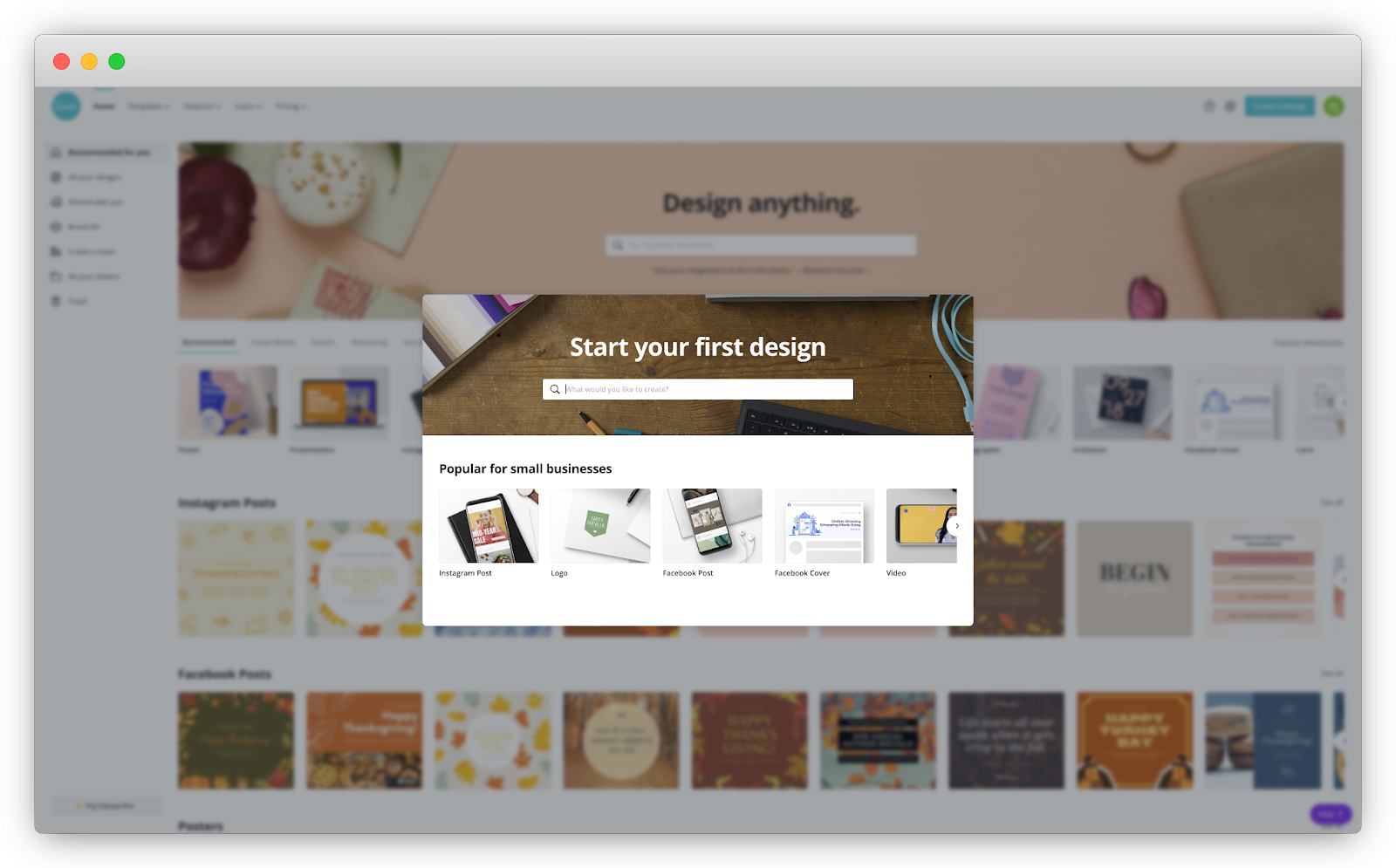
- Does it add to and help personalize the onboarding experience for users? One of Canva’s onboarding questions is, “What will you be using Canva for?” Based on this response, Canva suggests relevant designs and templates based on your needs that you saw in the previous example.

- Does it delight users and get them excited about the product? Wave showing how its invoice looks like with a user’s logo and brand colors is an example of this.
I call these questions the DAD test. (Yes, it’s a riff on Rob Fitzpatrick’s MOM test!)
B) Ease: reorganize steps from easiest to hardest
Baby steps are easier than large leaps. It’s much more painless to commit to a smaller task at first and then gradually increase the difficulty. Imagine trying to run a marathon if you’ve never even run five miles in your life!
The Principle of Commitment and Consistency states that the smaller the initial ask from someone, the more likely they are to agree to bigger requests. This principle can be applied to user onboarding by reorganizing the steps from easiest to hardest.
HEY, an email app created by the team behind Basecamp, does a good job of applying this principle to their user onboarding. They focus on teaching users one step at a time, with each step gradually increasing in complexity and difficulty.

If you’ve played any video game like Super Mario, you’ve also seen this in action. Usually, they start with showing users’ core actions. For Super Mario, this consists of moving forward, jumping, picking up a mushroom, and destroying a Koopa. As you become more familiar with the game, you learn new skills such as swimming, shooting fireballs, and running jumps.
The same principle can be applied to user onboarding. First, show core features of the product that users need to accomplish their Customer Job. As users become familiar with your product, unveil new options. This maintains simplicity for new users and brings power to advanced users.
Here’s the onboarding path for PartyParrot again:
- Enter email address
- Enter name
- Enter password
- Click “Create Account”
- Click “Create New Invitation”
- Select a party invitation template
- Add a description for the party
- Add the date and time for the party
- Add the location of the party
- Share ready-to-go party invitation link
For steps 1 and 2: “Enter email address” and “Enter name,” which one is an easier request to complete? Most likely, asking for a name. So flip them around.
We could probably take this a step further and ask users to create an account after they’ve already picked a party invitation template and filled in the details of their party. This is the Sunk Cost Effect in action. When people invest time, money, or effort into something, they’re motivated to make it work. By investing in the customization of their party invitations, users are more likely to create their accounts.
With this concept in place, we can replace step 5 with, “Click ‘Create an Account to Save Your Invite’”
- Select a party invitation template
- Add a description for the party
- Add the date and time for the party
- Add the location of the party
- Click “Create an Account to Save Your Invite”
- Enter name
- Enter email address
- Enter password
- Click “Create Account”
- Share ready-to-go party invitation link
We’ve now shrunk the onboarding path by 33% from 15 to 10 steps. Without unnecessary steps to bog new users down, more people will reach their First Strike!
For your onboarding, are there any steps you can reorganize from easiest to hardest?
C) Simplicity: show fewer options and break down complex signup and setup processes into smaller steps
There are situations where it’s not possible to remove or delay the bottlenecks in the user onboarding experience. In that case, simplify as much as possible.
According to Hick’s Law, the time it takes for users to make a decision increases logarithmically as you increase their number of choices. Thus, more choices lead to users becoming overwhelmed and abandoning the signup altogether. Take, for example, the following form with more than 20 fields. Would you sign up for this product?

For me, heck no! But I understand the intention. They’re probably trying to learn more information about new users.
But, come on, did they really need to ask for your suffix? Really?!
Let’s give them the benefit of the doubt and say all of those fields are absolutely necessary to experience the value of the product. Simplicity can still be achieved with a few tweaks.
First, consider a concept called progressive disclosure, where only a few essential options are shown to users, but a broader set is displayed upon request. In Shopify’s signup process, only three fields are visible.

The moment you let Shopify know you’re already selling online with another platform, a fourth field appears to ask which one you’re using.

This works because of Hick’s Law. Instead of cramming all of the information in one overlay page or setup wizard that almost everyone will ignore, guide users one step at a time by
showing fewer options. Whatever information you present should be contextual, relevant, and immediate.
The second approach to simplifying complex forms is to break them up into multiple pages. Shopify also achieves this in their signup process. On the first page, they ask for four pieces of information (or three depending on your answer to the first question) about your eCommerce business:
- Are you already selling?
- What system do you use the most?
- What is your current revenue?
- What industry will you be operating in?

Once you complete these fields, the next step is to answer 10 additional questions, all related to the business address.

By using a multi-step signup process, users only see a few fields on the page at a time, rather than the 14 required fields needed to complete it. Notice there are almost double the number of fields in the second step (10 fields) than in the first step (4 fields).
This is another example of the Principle of Commitment and Consistency in action. By breaking down the signup page into two pages and moving the majority of the fields to the final page, Shopify’s signup process is much more manageable.
Is there a way to show fewer options through progressive disclosure? Are there complex processes in your onboarding that could be broken up into smaller steps?
3. Finalize your Straight-Line Onboarding.
Now, back to those color-coded labels. Once you’ve labeled each step in the onboarding path, gather those green ones together. This is the first iteration of your Straight-Line Onboarding because they are the steps users need to take to experience a product’s value.
Again, here’s the Straight-Line Onboarding for PartyParrot:
- Select a party invitation template
- Add a description for the party
- Add the date and time for the party
- Add the location of the party
- Click “Create an Account to Save Your Invite”
- Enter name
- Enter email address
- Enter password
- Click “Create Account”
- Share ready-to-go party invitation link
It’s important to finalize this list with each team within your company. Everyone from product to engineering to customer support should have a say. Do they agree with each of the necessary steps for users to achieve their desired outcome? Would they add back in steps that you’ve removed or delayed? Would they remove any steps?
Segmenting Your User Onboarding
Now that you’ve built your product’s Straight-Line Onboarding, I want to share one concept that’s almost guaranteed to improve the performance of your user onboarding experience.
Segmentation is conversion steroids for user onboarding.
Ready?
Let me give you an absurd example to drive this point home.
Imagine if Disneyland cast members (a.k.a. their employees) forced visitors to follow a predetermined, one-size-fits-all schedule and route through the park. They’ve created it based on where the majority of the “average” guests go. The goal is to give visitors the full Disneyland experience as efficiently as possible.
.avif)
If this were the case, it would be pretty upsetting! The priorities of a couple on their honeymoon are different from a family with three kids. It doesn’t make sense to force everyone to undergo the same schedule and route.
This scenario sounds absurd, right? (Don’t worry, no cast members and Disneyland customers were harmed in this thought experiment!)
For most companies, their user onboarding is precisely this – a one-size-fits-all, linear experience for everyone. They’ve built their user onboarding for the “average” new user.
This might work with early-stage products, where that kind of focus helps channel all resources to reach product-market fit. But a product’s features will inevitably grow, expand, and mature. Shoppers will sign up for many different reasons.
A product might accomplish different Customer Jobs for separate market segments. So instead of a one-size-fits-all experience, tailor the user onboarding for each Customer Job.
In the example with Disneyland, cast members can better highlight shows and rides based on the preferences of each customer. For a couple on their honeymoon, they might suggest romantic restaurants and shows. For families with young kids, they might suggest age-appropriate rides and attractions.
With this approach, you can highlight the right features at the right time, giving users the tools to execute each specific job. You can also better position the product as the solution to their needs.
When we apply this thinking to The Bowling Alley Framework, we can assign users to a bowling alley based on their jobs-to-be-done. Each alley is a segment, and different Conversational and Product Bumpers can be designed to help new users accomplish the job they hired your product to do.

There are three main benefits of doing this:
- Users learn what they need to in order for them to experience their First Strike.
- You can get down to the specifics of how exactly your product can help them.
- You can increase user motivation by sending targeted messaging based on each user’s primary goal.
I provide a step-by-step guide to help identify your product’s Customer Jobs by doing user interviews in Appendix I. For each Customer Job, repeat the three steps to build a Straight-Line Onboarding experience.
The Next Action
Even if we create the best possible experience for users, we’re still going to see a lot of them stuck in the gutters; they’ll never return to the product. Others will find themselves off-track. We need to plan for those detours.
We can do that with bumpers that keep users in a straight line. That’s the next step in the EUREKA framework: keep new users engaged both inside and outside your product.
Chapter 7 Summary
- Straight-Line Onboarding is the minimum number of steps users need to take to achieve their First Strike.
- Here the three steps to build your Straight-Line Onboarding:
- Map out your onboarding path. Sign up for your own product as if it’s your first time. Document every step that’s required for users to achieve your product’s First Strike. Be sure to reference every field that you’re asking users to complete, including each button they need to click.
- Evaluate each step for necessity, ease, and simplicity. Remove or delay any steps that don’t lead to the First Strike. Reorganize steps from easiest to hardest. Show fewer options and break down complex signup and setup processes into smaller steps.
- Finalize your Straight-Line Onboarding. Everyone from product to engineering to customer support should have a say. Do they agree with each of the necessary steps for users to achieve their desired outcome? Would they add back in steps that you’ve removed or delayed? Would they remove any steps?
- Segmentation is conversion steroids for user onboarding.
- Tailor the user onboarding for each Customer Job so can highlight the right features at the right time, giving users the tools to execute each specific job.
Action Items to Improve Your User Onboarding
- Build your Straight-Line Onboarding using the steps from this chapter. You can download a fillable worksheet at productled.com/straight-line-onboarding.

Go all in on product-led growth.
Get three complementary playbooks to turn your product into your biggest growth engine. Read or listen anywhere, on your own or with your team.
Take {book} with you.
- Download the PDF and EPUB
- Listen to the full audiobook
- Read or listen on your preferred device
Get the complete ProductLed Library for $10 more.
- Product-Led Growth
- The Product-Led Playbook
- Product-Led Onboarding
- All three as PDFs, EPUBs, and audiobooks
- Wes Bush AI to help you apply what you learn
For individual use.
Get all three books
Give your team a shared playbook for growth.
- Everything in the three-book bundle
- Access for everyone on your team
- Each teammate chooses how to read or listen
- Wes Bush AI for every teammate
One purchase. Unlimited teammates.
Get the team bundlePrefer print? Get a paperback on Amazon →